An “interface” to iterate through and each and every element of a list (it’s not a class).
Blog
C# – Abstract Class vs Interface
| Abstract Class | Interface | |
| Multiple inheritance | Doesn’t support | support |
| Data Member | contains | Doesn’t contain |
| Constructor declaration | contains | Doesn’t contain |
| Definition | May contain definition with no implementation | Just a pattern, an empty shell |
| Methods | Can have both abstract & non-abstract methods | Can only have abstract methods |
| Implementation | Can contain both definition and its implementation
Incomplete class, cannot be instantiated |
Can only have the signature of the functionality without any code |
| Access Modifier | Can have all access modifiers for member declaration of functions, subs and properties. | Not allowed (all methods must be implicitly defined as public).
All the members assumed as implicitly public. |
| Homogeneity | is used for implementations of the same type, behavior and status | Is used for implementations that share only method signatures |
| Declaration | Acts as a base class for all other classes, can declare/ use any variable | Not allowed to declare any variables |
| Core vs Peripheral | Core identity of a class & for objects of the same data type | Used to define Peripheral ability of a class |
| Rigid vs Supple | More supple | More rigid |
| Fields definition | Predefined fields & constants | Fields cannot be defined in interfaces |
Abstract classes vs Concrete Classes
| Abstract Class | Concrete Class | |
| Type | Base class | Default class |
| Methods | May contain partially implemented methods | All methods are completely implemented |
| Functions | Some or all declared functions are purely virtual | No purely virtual functions |
| Instantiation | Cannot be instantiated | Can be instantiated |
Image Courtesy: tutorials.jenkov.com, stackoverflow.com
JSON vs XML
| JSON: JavaScript Object Notation | XML: eXtensible Markup Language | |
| data-oriented | document-oriented | |
| Types | Number, Array, Boolean, String, Object and Null | All string |
| Data | JSON Objects are typed | XML data is typeless |
| Simplicity of read/ write | √ shorter & faster, no end tag | |
| Easy to learn | √ | |
| Capability to display | No | Yes,
capable to display data because it is a markup language |
| Support array | √ | |
| secured | √more | |
| Human readable | √more | |
| Datatype support | only text and number | text, number, images, charts, graphs etc.
Also, XML offers options for transferring the format/structure of the data with actual data |
| Parsed by | a standard JavaScript function into ready-to-use JavaScript object | An XML parser |
SSRS (SQL Server Reporting Services)
SSRS is a server side report by Microsoft. I used that to create interactive and printed reports in my C#, ASP .Net MVC project when I need to have export the report from the view page to a file (PDF or Excel).
I design the reports by using MS Visual Studio 2012 and be able to test the preview of the reports.

It can connect to the MS SQL Server database as a data source

and have the specific data set that can use queries or stored procedures,
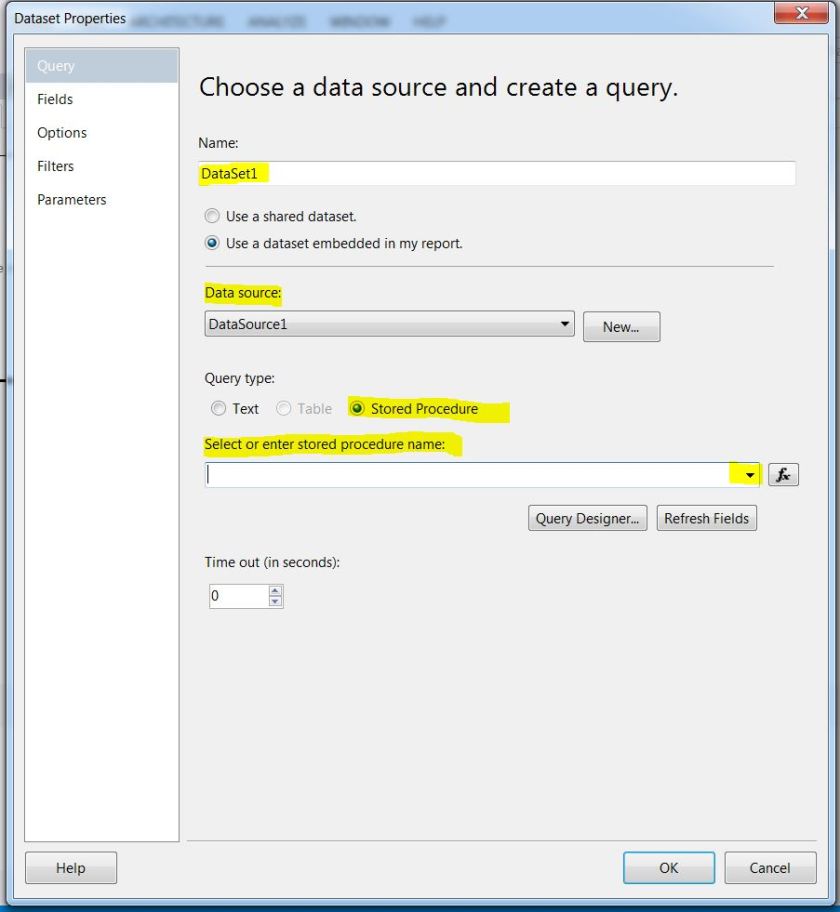
calculated fields and parameter values (entries for queries/ stored procedures).

Then the report will be created and we can add table, text box and etc. from the toolbox and design the report like this:
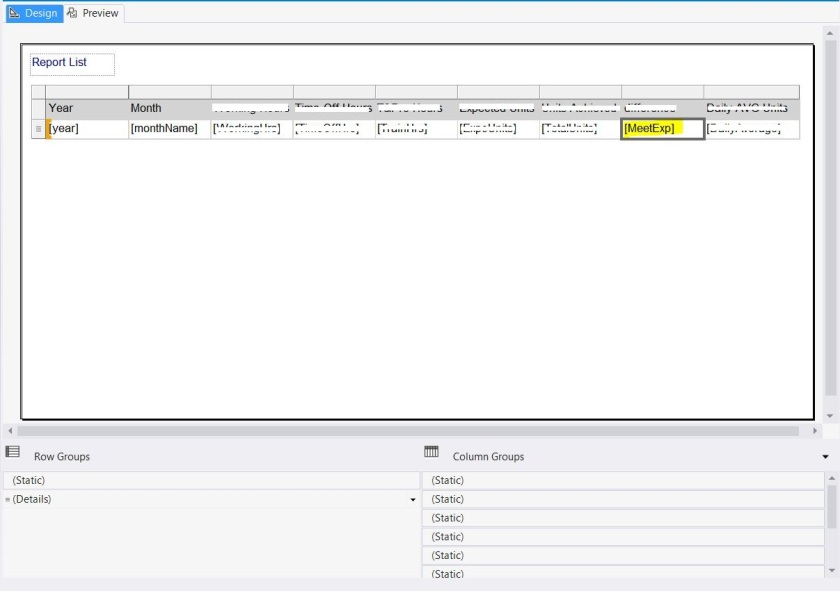
There is an option to edit the page layout and design the report or even have an expression for a specific textbox of the report; for instance if the calculated number is greater than zero make the field green and if it is less than zero make the field background red.
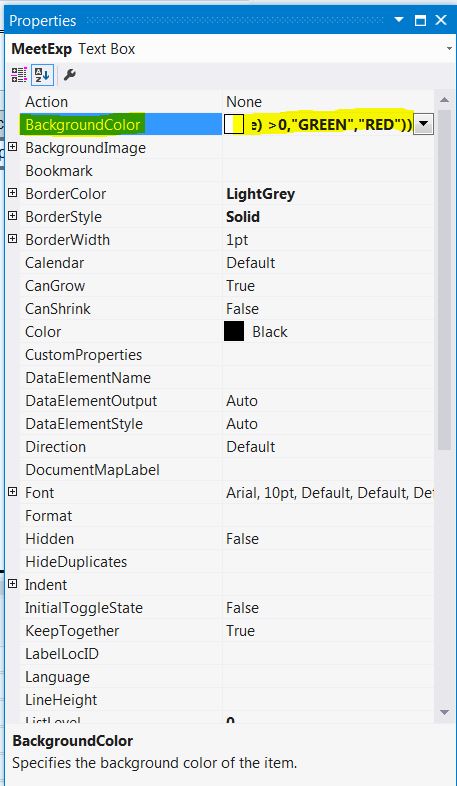
=IIF(VAL(ReportItems!MeetExp.Value) = 0,”No Color”,IIF(VAL(ReportItems!MeetExp.Value) >0,”GREEN”,”RED”))
After all these, we can test the report by preview tab and verify it is working correctly.
There was an issue that in the PDf I had some blank pages; the solution is: modifying the Margins of the report.
In the Design tab of the rdl report, right click on the grey part (outside of the report’s body) then select “Report Properties” and then change the width and Height to a bigger number.
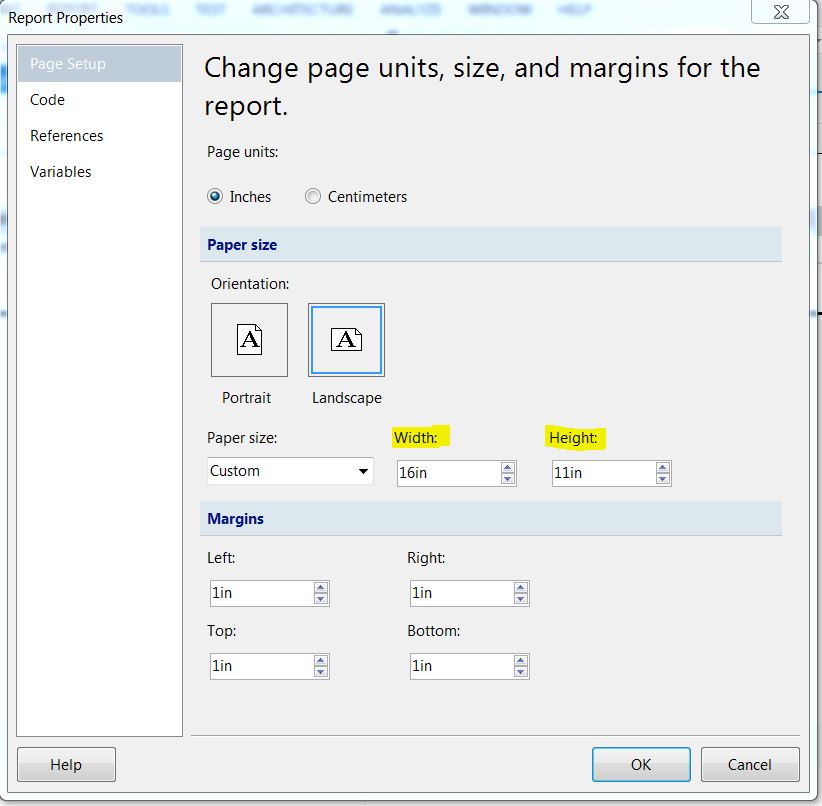
This can fix the problem.
DDL, DML, DCL and TCL
|
DDL (Data Definition Language) |
DML
(Data Manipulation Language) |
DCL
(Data Control Language) |
TCL (Transaction Control Language) |
| Create | Select | Grant | Commit |
| Alter | Insert | Revoke | Savepoint |
| Drop | Update | rollback | |
| Truncate | Delete | Set transaction | |
| Comment | Merge | ||
| Rename | Call | ||
| Explain plan | |||
| Lock-table |
Generics
A class, interface or method that declares one or more type variables (type parameters).
Advantages:
- Type-Casting
- Type-Safety (single type of objects)
- compile-time checking
public Class Box{ ——–> public Class Box<T>{
private Object obj; private T t;
public void set (Object obj){ public void set(T t){
this.obj=obj; this.t=t;
} }
public Object get(){ public T get(){
return obj; return t;
} }
} }
Transaction isolation levels
| 1 | Read Uncommitted | The user A start a query, then user B made some changes, A will see the changes have not been committed yet (dirty read) |
| 2 | Read committed | The user A start a query, user B made some changes and commit. But A will not see the changes made by B. |
| 3 | Repeatable Read | The user A will not see the changes made by B (insert/delete) read the snapshot established by the first read, so 2 queries executed, with 2 different results (phantom read). |
| 4 | Serializable | All transactions are completely in isolation fashion, executed serially one after another (lock-based concurrency control). |
In Oracle, Repeated Read level is not supported, but in MySQL default isolation level is repeated Read.
Statement vs. PreparedStatement in JDBC
|
Statement |
PreparedStatement |
| for executing static SQL statements | execute dynamic queries with parameter inputs |
| use String Concatenation to create the query and it can’t accept input parameters | Use setter methods to set the input parameters for the query |
| Suitable for DDL | Suitable for DML |
| Slower | Faster |
| Prevent SQL Injection attacks | |
AOP Concepts
| Joinpoint | A specific point in the code, every method in every class is a Joinpoint. |
| Pointcut | A collection of one or more Joinpoints, for example all the methods of a class. |
| Advice | The implementation of crosscutting concern, it means what do I want to do with crosscutting concern (Before, Around, After). |
| Aspect | What crosscutting concern do I execute (=Advice) at which location (=Pointcut); in other words what do I want to do, where do I want to do it in the code. –> advice + pointcut |
| Weave | The advice code together + Target code at corresponding Pointcuts such that we get the correct execution; it means different methods together with right sequence. |
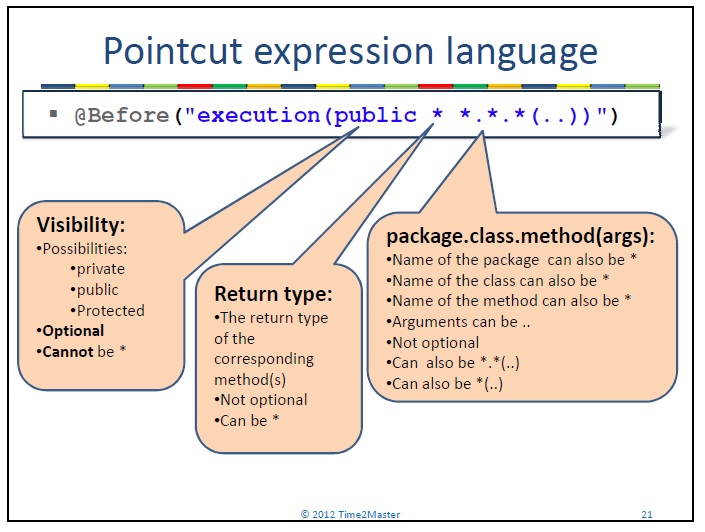
And this would be an example how we can write a Pointcut:
 Learn With Somayeh