| Data Structure | Description | Key Features | Use Cases | Performance |
| Array | Fixed-size, contiguous memory allocation. Used for storing elements of the same type. | – Constant-time access (O(1)) for indexed elements.- Cannot resize once created. | – Low-level data storage.- Known fixed size. | – Access: O(1)- Search: O(n)- Insertion/Deletion: Not supported efficiently |
| List (List<T>) | A dynamic array that resizes automatically when elements are added/removed. | – Dynamically resizable.- Maintains order of elements.- Supports LINQ queries. | – Storing ordered data.- Frequent additions/removals. | – Access: O(1)- Search: O(n)- Insertion/Deletion: O(n) (due to resizing or shifting elements) |
| Dictionary (HashMap) | A collection of key-value pairs implemented as a hash table. | – Fast lookups with unique keys.- Unordered.- Keys must be unique. | – Storing mappings (e.g., ID → Object). | – Access/Search: O(1) (average)- Insertion/Deletion: O(1) (average) |
| HashSet | A collection of unique elements, implemented as a hash table. | – Fast lookups.- Only stores unique elements.- Unordered. | – Checking membership.- Removing duplicates. | – Add/Search: O(1) (average)- Insertion/Deletion: O(1) |
| Queue | A FIFO (First-In-First-Out) collection. | – Enqueue (add to end).- Dequeue (remove from front).- Used for sequential processing. | – Task scheduling.- Order-sensitive tasks. | – Enqueue/Dequeue: O(1) |
| Stack | A LIFO (Last-In-First-Out) collection. | – Push (add to top).- Pop (remove from top).- Peek (view top element). | – Undo operations.- Depth-first search. | – Push/Pop: O(1) |
| SortedList | A sorted collection of key-value pairs (sorted by key). | – Maintains keys in sorted order.- Slower than Dictionary for large datasets. | – When sorted keys are important. | – Search: O(log n)- Insertion/Deletion: O(n) |
| LinkedList | A doubly linked list where each element points to the next and previous elements. | – Efficient insertion/deletion at any position.- No random access (sequential only). | – Frequent insertions/deletions.- Traversing data. | – Access/Search: O(n)- Insertion/Deletion: O(1) (if the node reference is known) |
Blog
MVC vs Flux vs Redux

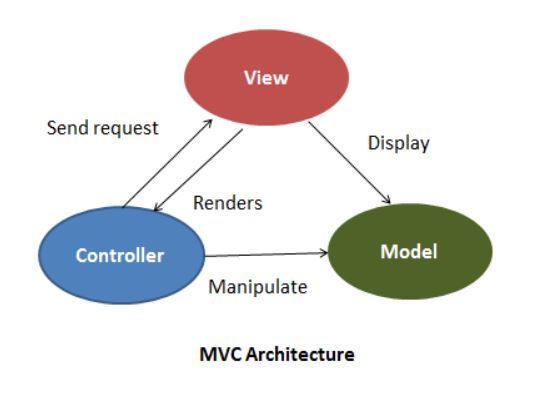
MVC – Model View Controller: Architectural design pattern for developing UI
Flux: Application Architecture to build client-side web applications.
Redux: open source JavaScript library used to create UI; generally works with Angular and React development.
—————————————————————————————————————————————–
MVC: the core idea of MVC is Separaion of Concerns (separation of presentation from the model and Controller from the view)
- Model: Maintain the data and behavior of an application
- View: The UI logic that represents/ displays the data (model)
- Controller: The logic that links the model to the View and external inputs (take user input, manipulate the model and causes the view to update)
Flux:
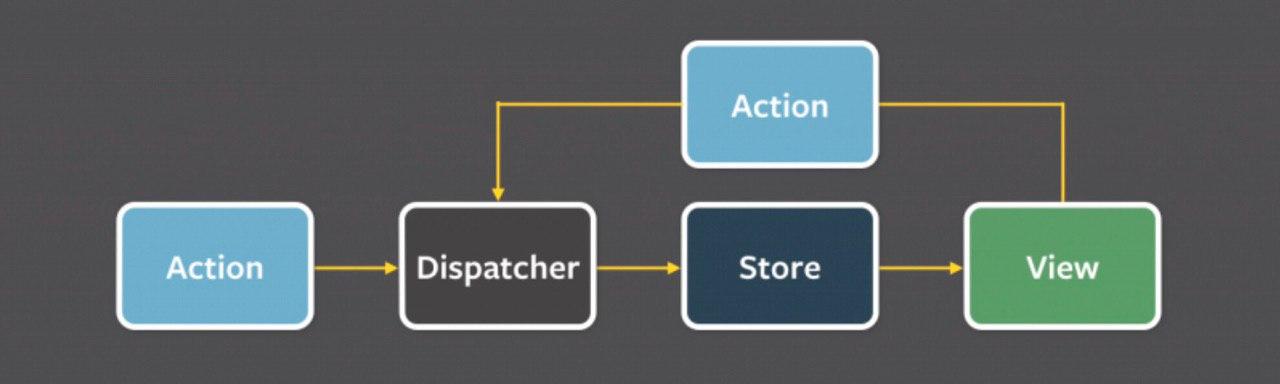
Actions: Helper methods that relay information to the dispatcher.
Stores: contains App’s logic and state (Models in MVC are single objects but Store in Flux can store anything)
Dispatcher: Coordinate the Actions and updates the Stores
View: same as the view in MVC but in the context of React & Flux (include Controller-Views for change events – retrieve App’s state from Stores)
Redux:
Actions: Collection of functions to perform request on server (send data between the Store and the App)
Reducers: Update the state of the Store
Store: Holds the app state and supply the helper methods for accessing the state.

| MVC | Flux | Redux | |
| Introduced | 1976 | Few years ago | 2015 |
| Architecture | Architectural Design Pattern for developing UI | Application architecture designed to build client-side web apps | Open-source JavaScript library used for creating the UI
Generally works with react & Angular |
| Data flow Direction | Follows the bidirectional flow | Follows the unidirectional flow | Follows the unidirectional flow |
| Single / Multiple Stores | NA | Includes multiple Stores | Includes single Store |
| Store modifiable | NA | mutable | Immutable (read-only) |
| Handle biz. Logic | Controller | Store | Reducer |
| Handle debugging | Difficult due to bidirectional flow | Simple debugging with the dispatcher | Single Store makes debugging lot easier |
| Usage | In both client & server-side frameworks | client-side framework | client-side framework |
| Support | – Front-end frameworks like AngularJS, Ember, Backbne, Sprout & Knockout
– Back-end frameworks like Spring, Ruby on Rails, Django, Meteor |
Front-end framework like React, AngularJS, Vue.js & Polymer | Front-end frameworks like React, Vue.js, AngularJS, Ember, Backbone.js, Meteor & Polymer |
| Scability | Complex | Easily | – |
| key | Data binding | Events / actions | – |
| Synchronous | Asynchronous | – |
References:
1- https://www.clariontech.com/blog/mvc-vs-flux-vs-redux-the-real-differences
2- https://syndicode.com/2017/09/19/flux-vs-mvc/
ReactJs vs React Native
It doesn’t sound right to compare “ReactJS” with “React Native” as they’re not variation of the same category;
- “ReactJS” (called React) is a “Library” of JavaScript.
- “React Native” is a mobile JavaScript “Framework” that allows the user to utilize the ReactJS for building up the components.
ReactJS created by Facebook team in 2011 and basically built to create user-friendly reusable UI components.
React Native built by Facebook in 2015 providing the React architecture to native iOS, Android and Windows applications. React Native facilitate cross-platform native app development (Single Environment for multiple platform) and combines the React components with native codes( Java, Objective-C and etc.)
Library vs Framework
The key difference between Library and Framework is in IoC (Inversion of Control)
- by using a feature from a Library you are in control.
- The Framework include some abstract design with built-in behaviors. Control is inverted and the framework calls you; framework code will call the code at those various points that behavior has inserted. The Hollywood principle: Don’t call Us, we’ll call You.
|
Library |
Framework |
| A certain set of reusable functions of an application (mostly organized into classes) | As a skeleton of an application |
| A collection of class definitions | A collection of patterns |
| You call the library APIs in your code | A framework calls your code |
| The control is always with you | The control in with the framework if you’re using it |
| Libraries meant to do some specific tasks only | Framework is a predefined design |
| You need to scaffold your project manually | Super easy to scaffold |
Groovy String comparison in WorkFusion
For instance I have this variable of json expression:
<var-def name=”successFlag”>
<json expression =”$….Response…..SuccessFlag”>
<var name=”HTTP_RESPONSE” />
</json>
</var-def>
to compare it with for an if else condition case, I need to create a boolean variable then put it in the condition; this was really tricky to use, I tried equals, == and some converting ones but this one works like a piece of cake:
then:
<case>
<if condition=”${eduSuccess.equals(‘true’)}”>
.
.
.
</if>
<else>
</else>
</case>
Groovy vs Java
| Java | Groovy | |
| Access modifier (by default) | package | public |
| getters and setters | Need to provide for fields | Are automatically generated for class members |
| Utility methods | System.out.println | println |
| Support substitution | Can print dynamic content without string concatation
Println(“Hello $name !”)
|
|
| Specifying type definition | Instead use keyword def
Mandatory for methods, optional for method arguments |
|
| Using semicolons | Every statements end with semicolon | optional |
| main method | To make a class executable | Don’t need |
| Initializing String arrays, static arrays | Curly braces { “abc”, “dfg”} | Square brackets [“abc”, “dfg”] |
| autoboxing/unboxing/conversion of primitives | yes | No, everything is Object and uses only Objects |
| Inner static classes | yes | no |
| Anonymous classes | yes | no |
Create New User with admin rights on MySQL Shell
Creating new user through MySQL Shell commands below, grant access to the user then connect to MySQL (through Workbench or Shell) with that user:
MySQL JS> \sql
MySQL JS> \connect root@localhost
Then enter password and Y (to save the password). Or root@{ip address or hostname).
MySQL localhost:33060+ ssl SQL > CREATE USER ‘user’@’serverhostname’ IDENTIFIED BY ‘password’;
MySQL localhost:33060+ ssl SQL > GRANT ALL PRIVILEGES ON *.* TO ‘user’@’serverhostname’ WITH GRANT OPTION;
MySQL localhost:33060+ ssl SQL > CREATE USER ‘user’@’%’ IDENTIFIED BY ‘password’;
MySQL localhost:33060+ ssl SQL > GRANT ALL PRIVILEGES ON *.* TO ‘user’@’%’ WITH GRANT OPTION;
Create a custom Alexa Lambda Function Skill
- Login to Amazon Developer account, Navigate to “AWS Lambda”; then create a new Lambda function using a blueprint with code for the basic functions that implements a simple skill in Node.js or Python. To start with sample code, click Blueprints, then select one of the skill kits, for instance “alexa-skills-kit-color-expert”
- Then Enter a “name” for the function.
- Select the “Role”, use the role under “Existing role”.
- and then “Create function”.
- This will create a sample that we can edit later as needed.
Then in another browser login to your “AWS Management Console” and navigate to AWS Lambda.
- Select “US East (N. Virginia) Region on upper-right corner of the console.

- Select “Enable” for Skill ID Verification.

- And copy the Skill ID from Developer Console > Your Skills > Skill-Name> Endpoint tab>

and past it into the Skill ID edit box as shown below:
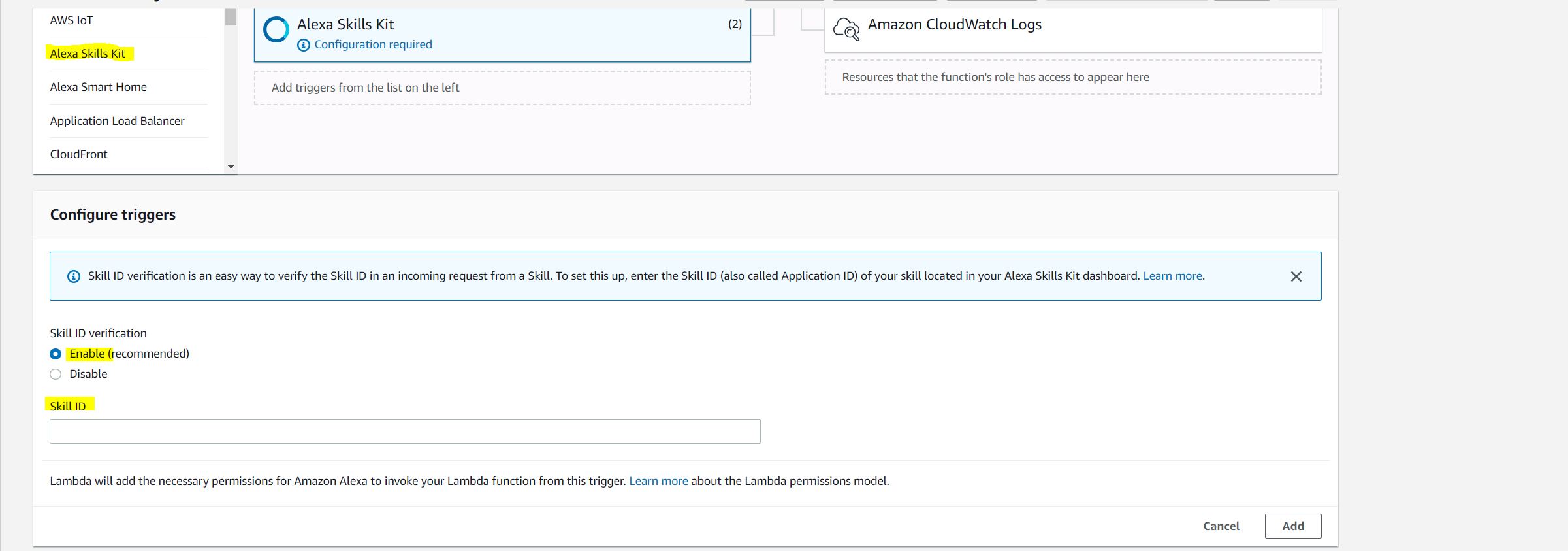
- Then click “Add” and “Save”. And copy the ARN from AWS Console and past into Skill Function > Endpoint > Default Region. In this way they can interact and handshake together.

To test our sample Lambda Function code in the Console:
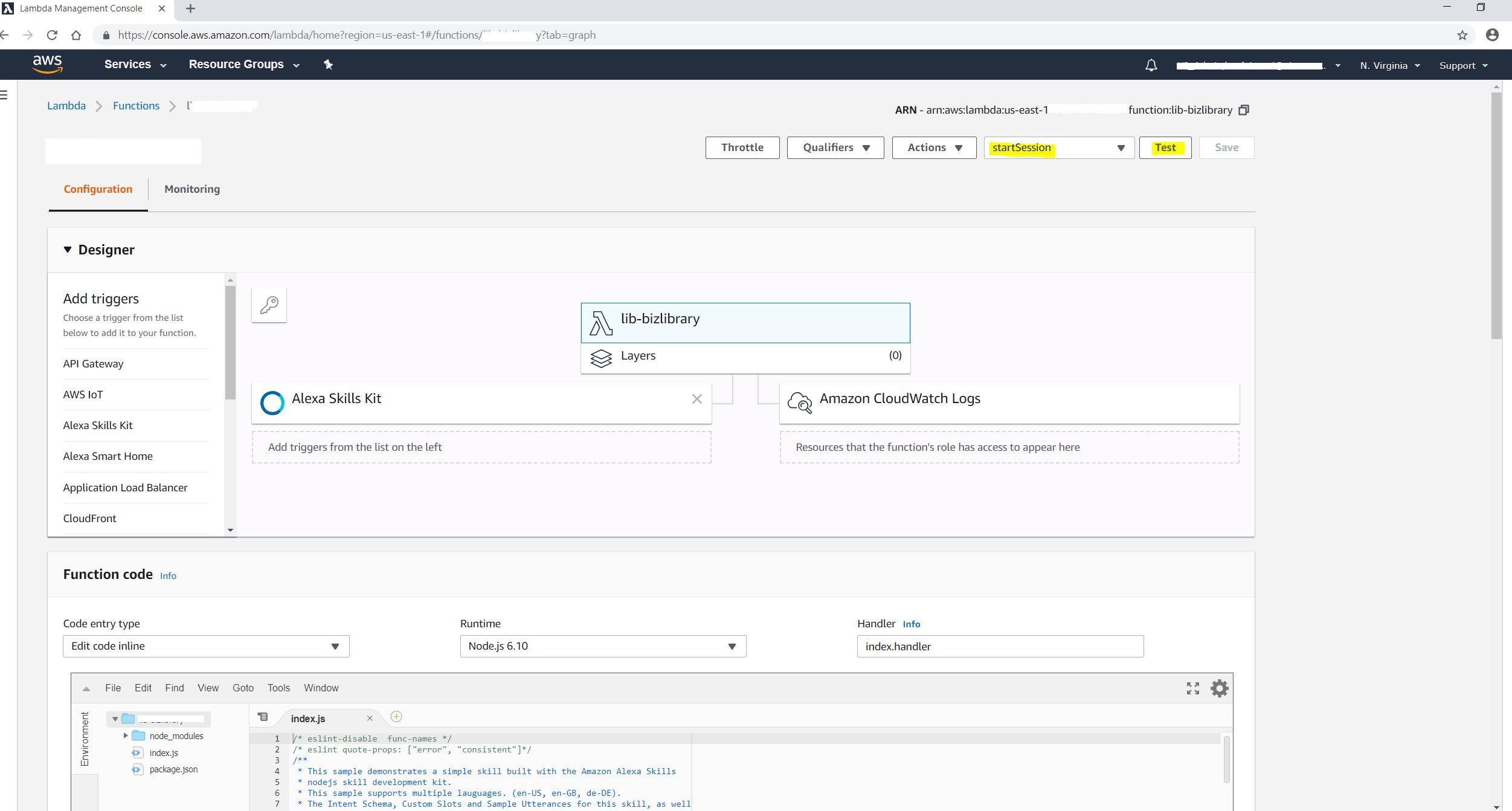
- In the Function list, click the function name to open the details for the function and click the “select a test event > configure test events > Create new test event > Select one of the sample Alexa requests from the Event template, I choose “Alexa Start Session” > Enter the Event name > Create.

Then click the “Test” button. The Execution result should be succeeded.
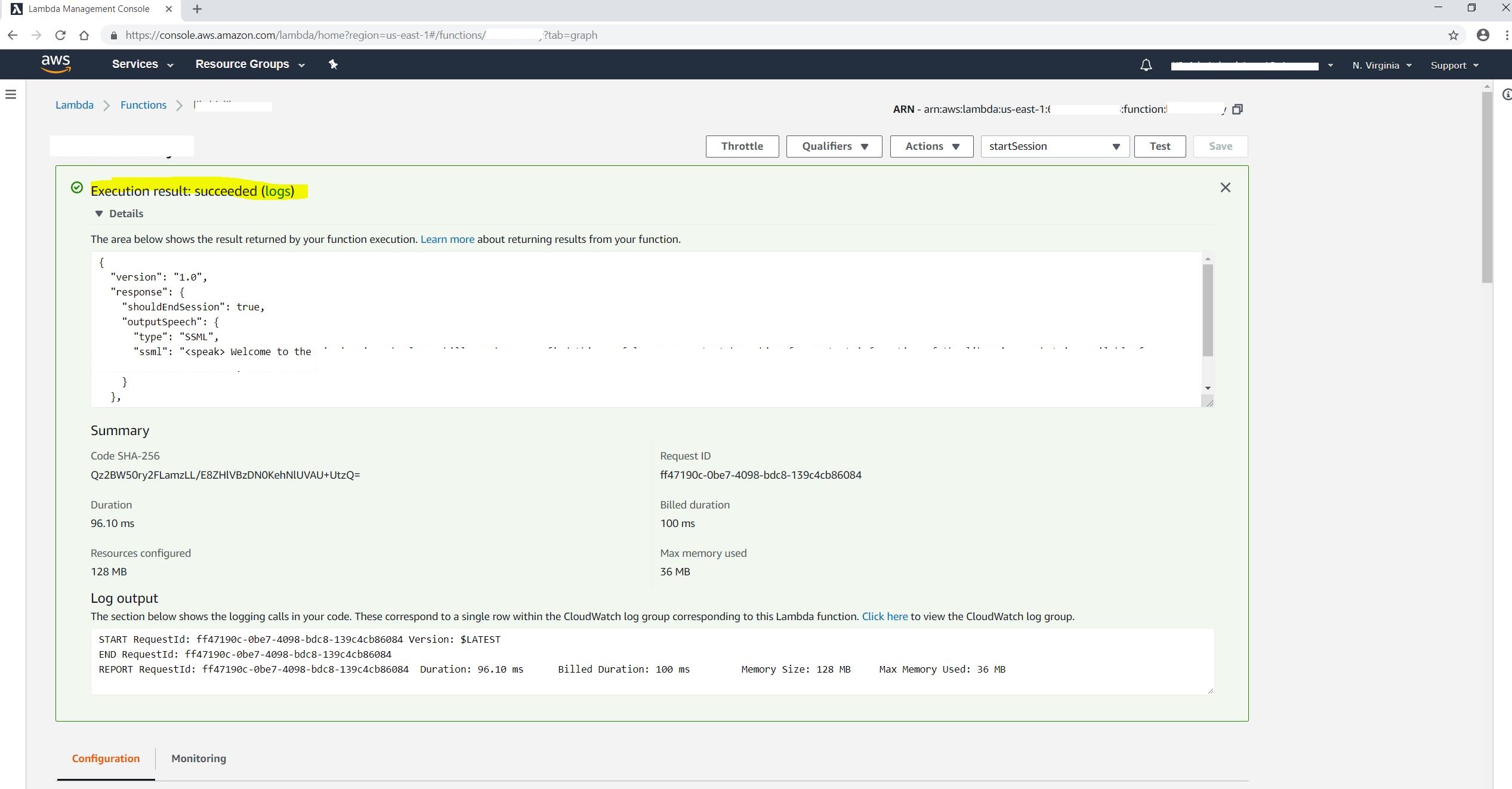
This test was for testing the interaction. To test the skill itself, we open the skill at developer amazon console; there is a “Skill builder checklist” that I modified as needed;
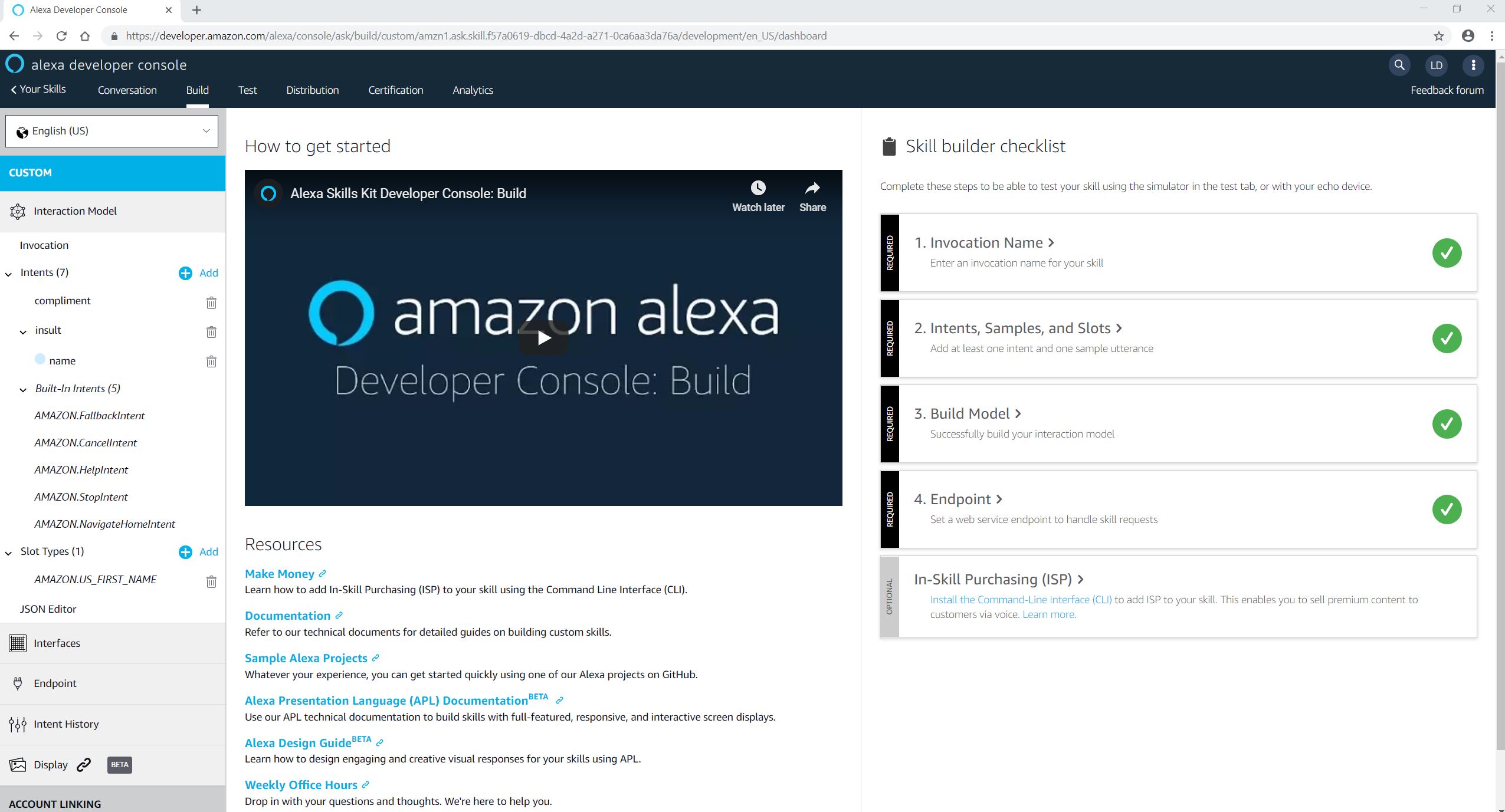
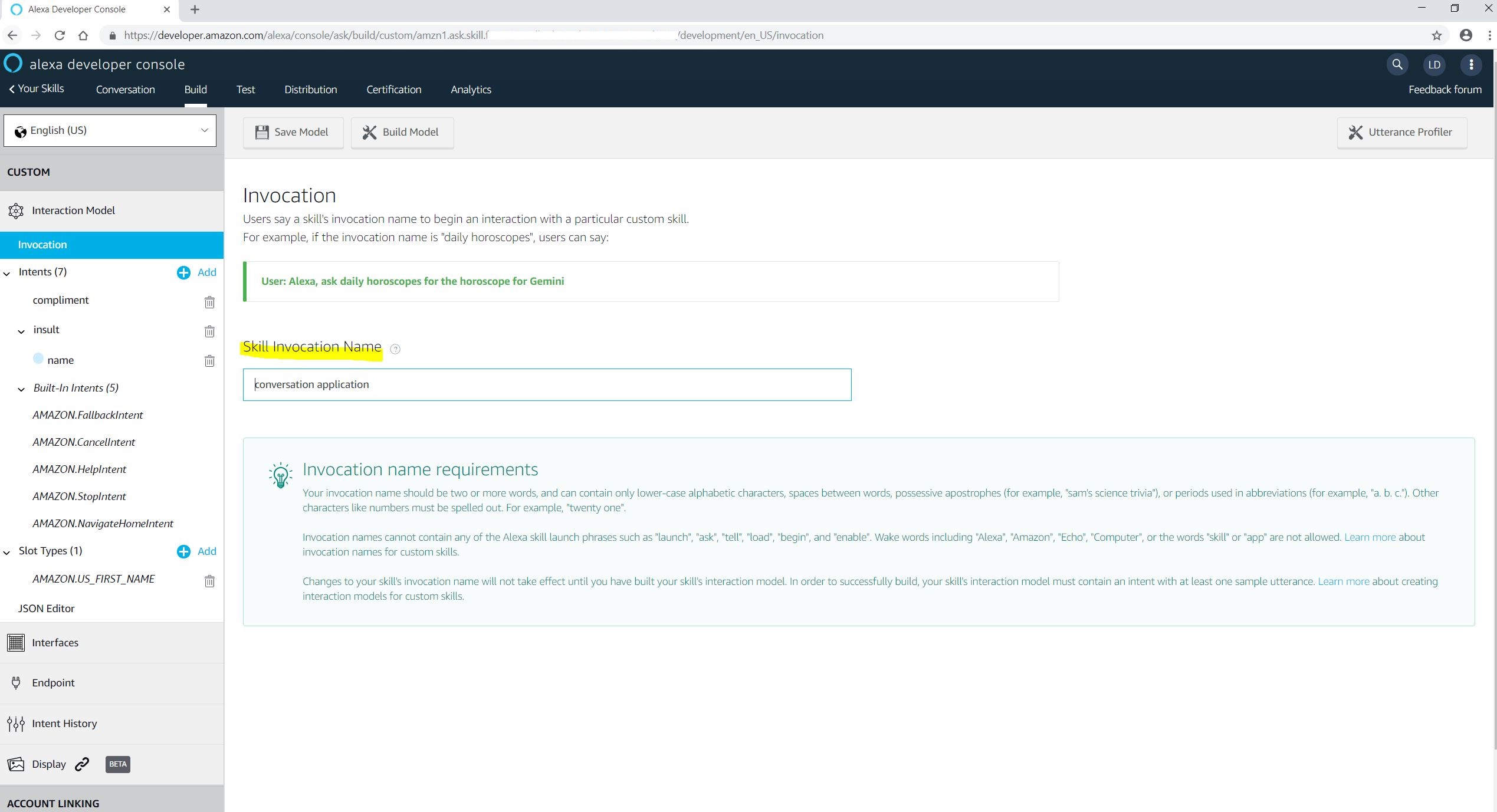
“Invocation Name” is the name of the skill to begin interaction with a particular custom skill; for instance, if invocation name is: business library then user can say: hey Alexa, open / start {Skill Invocation Name}.
An “Intent” represents an action that fulfills a user’s spoken request. Intents can optionally have arguments called “Slots”. For example, in a Library Skill; defining librarians contact define an intent name “librarianContact” that has slots named name or contact.
There are two json files to modify/ import the custom function skill; one in developer console to “Json editor” that defines the interaction and one at AWS Console “index.js”.
Then Click “Build Model”.

Then Click “Test” menu, to test the custom skill;
- In the text box in Alexa Simulator, type: Alexa, open {Invocation Name};
It will show the content we provided in the “WELCOME_MESSAGE” in the json file (index.js).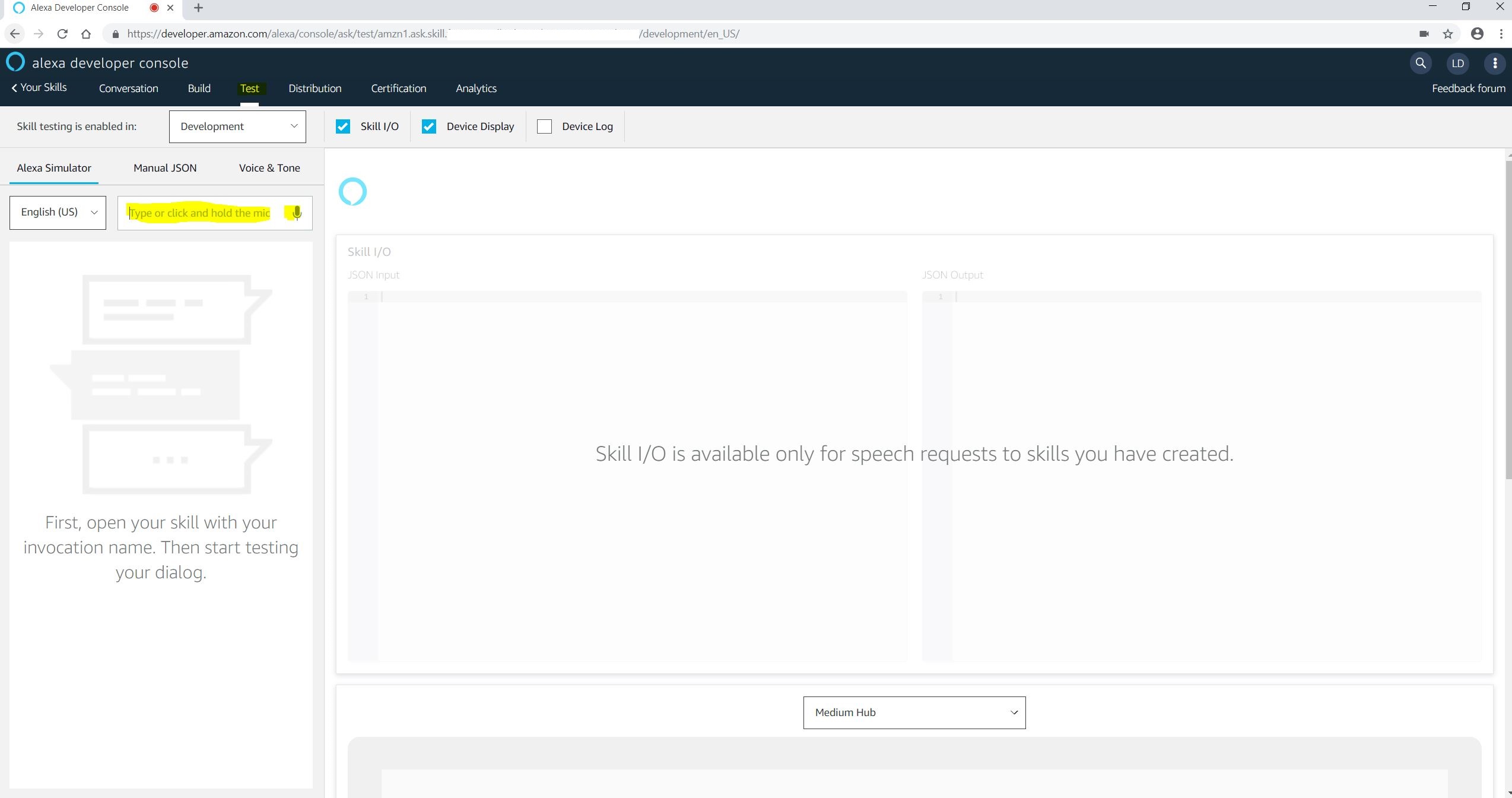
Then we can ask or type more questions to interact with the simulator.
Functional Interface vs Marker Interface
a Marker interface doesn’t have any methods or fields declaration (an empty interface) such as “Serializable” or “Cloneable”.
a Functional Interface is an interface with just one abstract method declared in it such as Runnable interface that only has run() method.
Static keyword in C#
| Static class | cannot be instantiated using the “new” keyword
|
| Static items | only access other static items. Share resources between multiple users
|
| Static constructor | in non-static class: runs only once when class instantiated first time
|
| In static class: runs only once when any of its static members accessed for the first time | |
| Static members | are allocated in high frequency heap area of the memory |
 Learn With Somayeh